


Example: GNUPLOT basics

Published 2006-11-15 | Author: The TikZ and PGF manual

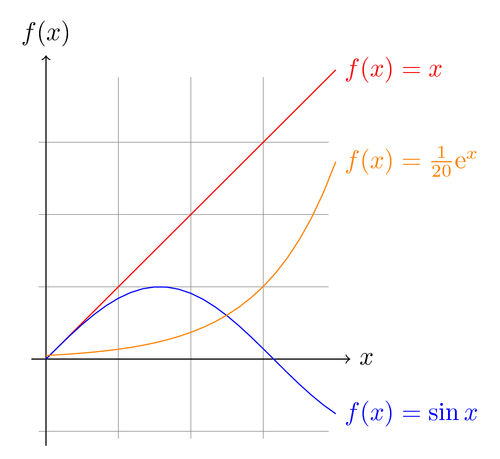
PGF/TikZ provides a convenient mechanism for plotting functions using GNUPLOT. To run this example for the first time you have to do the following:

  • GNUPLOT must be installed on your system. Try typing gnuplot on the command line to see if it's installed. Windows users may have to rename wgnuplot to gnuplot.
  • You must allow TeX to run external programs. The command line option to enable this is usually --shell-escape or --enable-write18

PGF will call GNUPLOT for you and store the data in a file. Next time you compile the example, data will be loaded from the generated file. See section 11.12.3 in the manual for more information.

Author: Till Tantau
Source: The PGF/TikZ manual
Download as: [PDF] [TEX]

GNUPLOT basics
% Author: Till Tantau
% Source: The PGF/TikZ manual
\documentclass{article}

\usepackage[latin1]{inputenc}
\usepackage{tikz}

% GNUPLOT required
\begin{document}
\pagestyle{empty}


\begin{tikzpicture}[domain=0:4]
    \draw[very thin,color=gray] (-0.1,-1.1) grid (3.9,3.9);
    \draw[->] (-0.2,0) -- (4.2,0) node[right] {$x$};
    \draw[->] (0,-1.2) -- (0,4.2) node[above] {$f(x)$};
    \draw[color=red] plot[id=x] function{x} 
        node[right] {$f(x) =x$};
    \draw[color=blue] plot[id=sin] function{sin(x)} 
        node[right] {$f(x) = \sin x$};
    \draw[color=orange] plot[id=exp] function{0.05*exp(x)} 
        node[right] {$f(x) = \frac{1}{20} \mathrm e^x$};
\end{tikzpicture}


\end{document}

Comments

  • #1 Rafael, January 17, 2009 at 12:17 a.m.

    Hi, I'm trying to use this code but I get error messages:

    Package pgf Warning: Plot data file `index.x.table' not found. on input line 16.

    Package pgf Warning: Plot data file `index.sin.table' not found. on input line 18.

    Package pgf Warning: Plot data file `index.exp.table' not found. on input line 20.

    I tried to compile using the command:

    latex myfile.tex --shell-escape

  • #2 Kjell Magne Fauske, January 17, 2009 at 11:58 a.m.

    @Rafael. Have you checked that gnuplot is available? Try typing gnuplot at the command line.

  • #3 Chris H, March 5, 2009 at 6:05 p.m.

    Rafael,

    Try putting the filename after -shell-escape:

    latex -shell-escape myfile.tex

    (I get the same error if I put -shell-escape after the filename. Also, despite the instructions above, the latex documentation tells me to use -shell-escape, not --shell-escape, though it seems to accept both.)

    If that still doesn't work, a horrible workaround is to run latex, run gnuplot by hand ("gnuplot *.gnuplot"), and then run latex again.

    I suffered from the same error for a while, found the offending write18 command in pgfmoduleplot.code.tex, thought, "They should really point out in the documentation that you need to enable shell escapes," and then felt really dumb after seeing it was there all along. For the sake of others who neglect the instructions, I would suggest a more detailed error message, like "Plot data file `#1' not found. Perhaps you need to enable shell escapes with '-shell-escape' or '-enable-write18'?"

    Chris H.

  • #4 Kjell Magne Fauske, March 5, 2009 at 8:17 p.m.

    You can also enable shell escape by putting the following line at the top of your document:

    %& -shell-escape
    
  • #5 Adam, March 24, 2009 at 9:29 p.m.

    Another word of warning:

    The automatic gnuplot function doesn't work if -aux-directory is set. The ".gnuplot" file(s) are correctly written in the aux directory, but are not correctly passed through gnuplot to generate the ".table" file(s).

    This seems to be noticed here:

    http://www.archivum.info/fr.comp.text.tex/2008-01/msg00562.html

  • #6 hendri, April 23, 2009 at 11:44 a.m.

    i also have same problem, i have install gnuplot this in vista. How to know that my gnuplot has working or not. Please inform me, as i am windows user only. the axis is shown, but line curve line isnot shown after compillation.

  • #7 Rafael, April 24, 2009 at 12:58 a.m.

    Using -shell-escape and -enable-write18 works for me but putting

    %& -shell-escape -enable-write18

    at the top of the document does not work.

  • #8 hendri, April 24, 2009 at 6:56 a.m.

    @rafael thank a lot, it is work!!! your suggestion to use:

    %& -shell-escape -enable-write18

    can resolve the problem. my computer configuration: MS Vista SP1, Miktex 2.7 and Texmaker 1.8, installed with pgf/tikz and gnuplot

    maybe if the else who have same problem can use this way..

    thank you very much, rafael

  • #9 hendri, April 24, 2009 at 5:50 p.m.

    after success in Vista, I tried to use the same solution for Microsfot XP SP2, with Miktex 2.7 and Texmaker 1.8. It didn't work. I have tried to write "%& -shell-escape " , also " -enable-write18 " and " %& -shell-escape -enable-write18 " on the top of ducument. Anybody can help me?

  • #10 hendri, April 28, 2009 at 7:51 p.m.

    i can use gnuplot now. The solution are:

    1. go to windows environment,add: name:PATH, variable: C:/...../bin (the directory of your gnuplot)
    2. then use write: %& -shell-escape in the top of your *.tex document.
  • #11 cfr, April 29, 2009 at 3:52 p.m.

    try pdflatex instead latex.

  • #12 jannik, May 3, 2009 at 12:08 a.m.

    thank you very much, hendri, i had the same problem and it worked for me, too :)

  • #13 hendri, August 20, 2009 at 8:58 a.m.

    I change my computer with Win XP sp3 japanese version, Texmaker 1.9.2, Miktex 2.7. I can`t run gnuplot anymore as I succeed do that in previous my WinXP and Win Vista PC.
    The error message show: "file *.table not found" Anybody can help me?

  • #14 ronald, September 21, 2009 at 11:12 p.m.

    I have to use

    %& --shell-escape dubble -- in front of shell

    as the first line of my latex-file (miktex 2.7)

  • #15 Bogdan, September 24, 2009 at 11:34 p.m.

    Hi, the magic command:

    %& --shell-escape dubble

    works on my Vista !

    Thanks

    Bogdan

  • #16 Marco, October 19, 2009 at 2:17 p.m.

    I renamed wgnuplot.exe on Win Vista to gnuplot.exe and added the path to the binary as suggested, also used the --shell-escape commandline argument, but it would not work either.

    The problem was fixed renaming pgnuplot.exe to gnuplot.exe

  • #17 Herman, October 31, 2009 at 1:05 a.m.

    Hi,

    Is it possible to do gnuplot splot with PGF/TikZ ?

    I want to have equivalent PGF/TikZ code for following gnuplot code. At the moment I'm using the gnuplottex package but because it only works in monochrome the result looks ugly as hell.

     set parametric
     set angle degree
     set urange [90:270]
     set hidden3d
     set vrange [-90:90]
     set isosample 36,18
     set ticslevel 0
     set size 0.65,1.0
     set xrange [-.1:.1]
     set yrange [-.1:.1]
     set zrange [-.1:.1]
     a=1.0/(4*pi)
     fx(u,v)=cos(u)*cos(v)
     fy(u,v)=sin(u)*cos(v)
     fz(v)=sin(v)
     splot a*fx(u,v),a*fy(u,v),a*fz(v)
    
  • #18 Kjell Magne Fauske, October 31, 2009 at 7:27 a.m.

    As far as I know, PGF can't plot 3D-plots generated by GNUPLOT. You could try the GNUPLOT TikZ terminal. You should also check out pgfplots. The development version may have support for 3D-plots.

  • #19 Herman, October 31, 2009 at 2:50 p.m.

    The GNUPLOT TikZ terminal works fantastic! At the moment I'm fiddling with the gnuplottex package code so I can have the GNUPLOT script commands inline in a TeX document and have the whole thing (text & gnuplot graphics) 'compiled' in one pass.

    Just for the record : For ppl who are using windows ... at the moment the experimental MinGW compiled gnuplot with TikZ/lua support from the gnuplot page is broken :s (server error). You can download a GNUPLOT version that works from http://peter.affenbande.org/gnuplot/

    PS : pgfplots doesn't do 3D graphics either

  • #20 Herman, October 31, 2009 at 6:19 p.m.

    Update :) For all who had/have the same problem like me plotting 3D graphics with GNUPLOT in (pdf)TeX with inline code in color on windows (MikTeX) this mini howto (I could'nt find hints on the net, that's why I'm putting this in this comment)

    a) download the patched gnuplot windows executable from peter affenbande his site (see previous post)

    b) rename pgnuplot.exe to gnuplot.exe and put the executable gnuplot.exe in a directory that's included in the windows path environment (I use c: windows system32)

    c) Download gnuplot.lua & gnuplot-lua-tikz.sty from peter affenbande his site. Place both these files in the directory where you're TeX document on which you're working resides.

    d) Configure TeX so that shell escape is allowed (in TeXnicCenter for example add --shell-escape --enable-write18 as argument to pdflatex.exe in the output profile LaTeX=>PDF (Alt-F7)

    e) In the preamble of your document add folowing lines

     \usepackage[miktex]{gnuplottex}
     \usepackage{tikz}
     \usepackage{gnuplot-lua-tikz}
     \usepackage{mathpazo}
    

    f) In your TeX document where you want your plot to appear do some kind like this

     \begin{gnuplot}[scale=0.95,terminal=lua]
         set parametric
         set angle degree
         set urange [0:360]
         set vrange [-90:90]
         fx(u,v)=cos(u)*cos(v)
         fy(u,v)=sin(u)*cos(v)
         fz(v)=sin(v)
         splot fx(u,v),fy(u,v),fz(v)
     \end{gnuplot}
    

    Works like a charm, now you have a) color plots without using pstricks and/or pst-pdf b) the possibility to have 3D plots c) the possibility to use TikZ code in your plots d) you don't have to make the plots by hand e) all is made in only one run ...

    Happy plotting !

  • #21 Kjell Magne Fauske, November 1, 2009 at 10:55 a.m.

    Thank you Herman for the detailed write-up. Really useful.

  • #22 Hendri, November 15, 2009 at 8:48 a.m.

    At least after month passed, I can call gnuplot. The secret is have to change the name of file into one word only. For example: file name "progress report.tex" have to change into "progressreport.tex" . Then I write %& --shell-enable at the top of document as suggested by others. That is all. I hope I can help somebody who has same problems.

  • #23 Kjell Magne Fauske, November 16, 2009 at 9:29 p.m.

    If you have problems using newer versions of Gnuplot, you should install the latest version of PGF from CVS. Recently a compatibility issue with newer version of Gnuplot was fixed. You can download recent builds from the builds section of this site.

  • #24 mithra, December 1, 2009 at 6:38 a.m.

    when i give the command plot "force.dat" using 1:2 title "A"

    it gives a warning: skipping unreadable file "trail.xls" , no data in the plot

    what may be the possible reasons for this? how to solve this problem? how to read the data values from a table made under file with .xls(excel sheet)?? pls do help

  • #25 Sam, January 5, 2010 at 12:22 a.m.

    Hey, cool thing! But how am I able to use LaTeX or even Tikz inside of begin{gnuplot}end{gnuplot}? $alpha$ doesn't work...

  • #26 Kjell Magne Fauske, January 5, 2010 at 10:06 a.m.

    @Sam. Check out the Gnuplot TikZ terminal site for examples.

  • #27 Nham Ngoc Tan, February 17, 2010 at 7:48 a.m.

    Скажите, пожалуйста, как построить график функции f(x,y)= x^2+y^2 для Tikz? Спасибо вам большое!

Post a comment

Markdown syntax enabled. No HTML allowed.