


An example of the folding library and the folding library, straight from the manual.
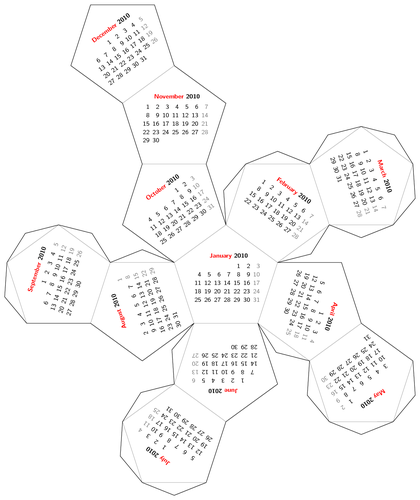
Edit and compile if you like:
\documentclass{article}
% Folding + calendar example from the PGF manual.
%
% Author: Till Tantau
\usepackage{tikz}
\usetikzlibrary{calendar,folding}

\usepackage[active,tightpage]{preview}
\PreviewEnvironment{tikzpicture}
\setlength\PreviewBorder{5pt}%


\begin{document}
    \sffamily\scriptsize
    \begin{tikzpicture}[transform shape,
        every calendar/.style={
            at={(-8ex,4ex)},
            week list,
            month label above centered,
            month text=\bfseries\textcolor{red}{\%mt} \%y0,
            if={(Sunday) [black!50]}
        }]
    \tikzfoldingdodecahedron[
        folding line length=2.5cm,
        face 1={ \calendar [dates=\the\year-01-01 to \the\year-01-last];},
        face 2={ \calendar [dates=\the\year-02-01 to \the\year-02-last];},
        face 3={ \calendar [dates=\the\year-03-01 to \the\year-03-last];},
        face 4={ \calendar [dates=\the\year-04-01 to \the\year-04-last];},
        face 5={ \calendar [dates=\the\year-05-01 to \the\year-05-last];},
        face 6={ \calendar [dates=\the\year-06-01 to \the\year-06-last];},
        face 7={ \calendar [dates=\the\year-07-01 to \the\year-07-last];},
        face 8={ \calendar [dates=\the\year-08-01 to \the\year-08-last];},
        face 9={ \calendar [dates=\the\year-09-01 to \the\year-09-last];},
        face 10={\calendar [dates=\the\year-10-01 to \the\year-10-last];},
        face 11={\calendar [dates=\the\year-11-01 to \the\year-11-last];},
        face 12={\calendar [dates=\the\year-12-01 to \the\year-12-last];}
    ];
    \end{tikzpicture}
\end{document}
Click to download: foldable-dodecahedron-with-calendar.tex • foldable-dodecahedron-with-calendar.pdf
Open in Overleaf: foldable-dodecahedron-with-calendar.tex